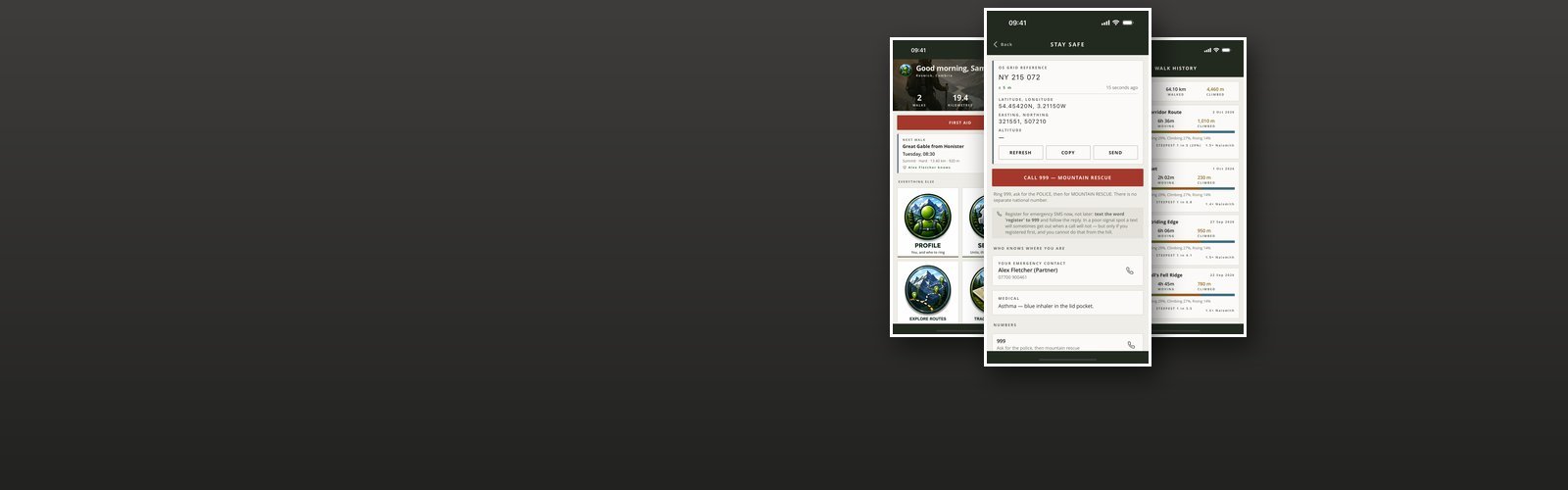

Peaks and Paths
Peaks and Paths is a working iPhone app for walking in hills. Everything it holds — the walks, the photographs, the notes and the planned walks — stays in the app’s own storage rather than on somebody else’s server, and the app can be put behind its own PIN.
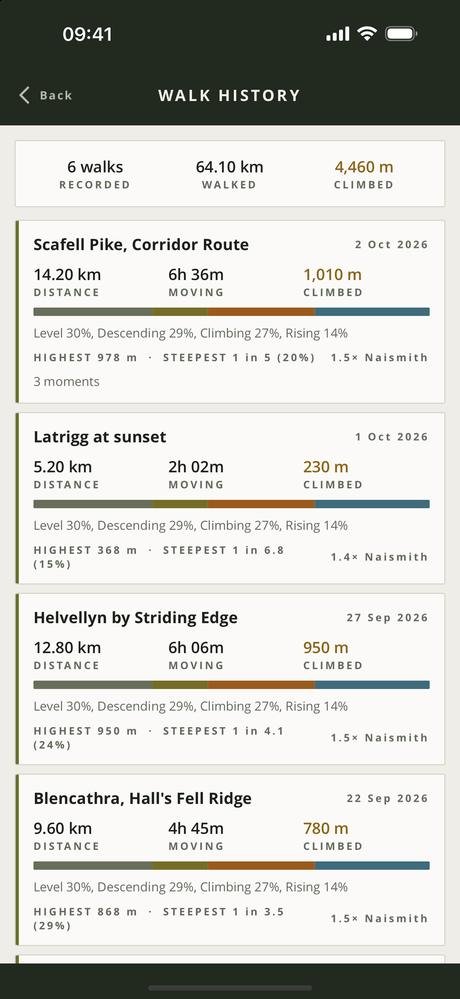
The screen that justifies the app is the climb. Distance and pace do not describe a walk: eight flat kilometres along a canal and eight up Scafell Pike are the same number and nothing alike, and the whole difference is in the ascent. So every walk is broken down by gradient — level, rising, climbing, descending — with the seconds and the metres in each, the cumulative ascent and descent, the highest point reached, and a Naismith’s-rule estimate held up against the time it actually took.
Tracking a walk. The route draws itself as you go. It keeps measuring with the phone locked or in your pocket, and stops the moment you finish — nothing is tracked outside a walk. Six one-tap marks for what happened — summit, viewpoint, hazard, gate, water, rest — plus notes typed or spoken aloud, each pinned to where you were standing. It pauses itself when you stop and picks up again when you move.
It is careful about it. GPS altitude carries ten to fifteen metres of error, which is larger than most of the steps being measured, so the altitude is smoothed before any gradient is taken from it, a climb is only banked once the ground has genuinely turned, and each band is labelled on screen with the gradient behind it rather than implying a precision that is not there.
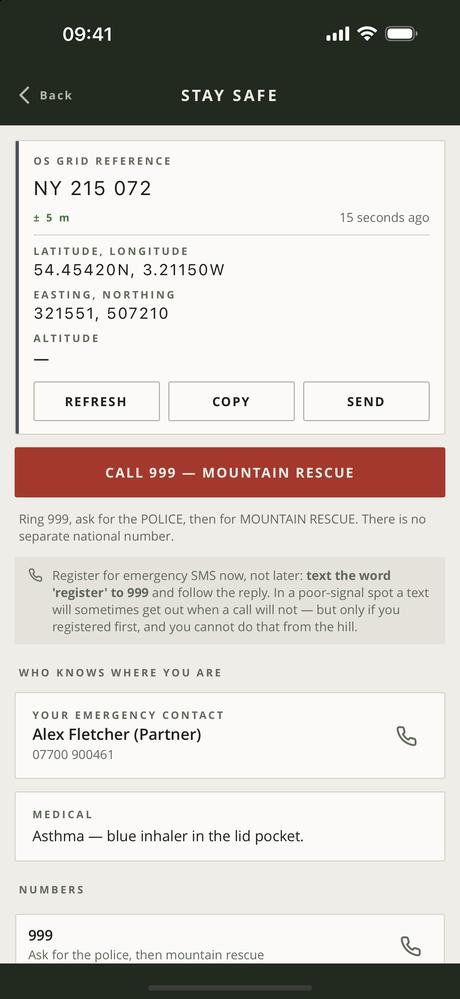
Where you are, in the form somebody asks for it. A six-figure British National Grid reference with its square letters, beside decimal latitude and longitude, with accuracy and altitude and a button to copy it. It is worked out on the phone with no network involved. Outside Great Britain it says so and shows degrees instead, because a grid reference for a Spanish hillside is a wrong answer rather than no answer. Beside it: who you left word with, where you said you were going, when you are due back, and a button to call them; the emergency numbers, and the reminder that texting 999 has to be registered before the day you need it; and a distress signal that flashes the torch six times a minute, the rhythm somebody looking for you is taught to watch for.
First aid is twenty-nine topics for walking and wilderness, hypothermia first, because it is the one that kills walkers in this country and because the traditional answers to it are actively harmful. Every topic says what it looks like, what to do and what not to do. The topics are grouped and searchable. It is guidance and not a substitute for 999, and it says so on screen.
Compass and water. A compass card with your grid reference, latitude and longitude, altitude and accuracy round it, the back bearing, and a bearing to follow that says which way to turn. It can show the nearest postcode too, looked up through Apple only if you choose. And a reminder to drink while you walk, on the interval you set, with the phone in your pocket.
- On the App StoreAs Tameside Peaks and Paths, version 1.1.0
- PlatformiPhone, portrait, iOS 15 and later
- StorageOn device only, PIN protected; no advertising, analytics or tracking
- ScreensHome, plan, tracker, history, safety, first aid, compass, water, gallery, notes, profile, settings
- TrackingDuring a walk only, and it keeps measuring with the phone locked or in a pocket
Free, and what a subscription unlocks
Tracking a walk is free, and so are the compass and the water reminder, and so is everything you would want in an emergency. The safety screen — your grid reference, the person you left word with, and the distress signal — is free and is not a candidate for anything else. So is the whole first aid library, on principle: hypothermia does not wait for a payment screen.
A subscription unlocks the record-keeping — planning a walk in advance, the history of every walk you have done with its climb and gradient breakdown, the gallery of photographs and video, and the typed and spoken notes pinned to where you were standing. It comes in two lengths, monthly and quarterly, and renews until you cancel it at least 24 hours before the end of the period, from the Manage subscription button in the app or in your App Store account settings.
- Monthly See the App Store renews every month
- Quarterly See the App Store renews every three months
Prices are not listed here, because they can change. Check the App Store for the up-to-date price, in your own currency, before you subscribe — it is the App Store that takes the payment. Most of the apps give new subscribers an introductory offer: an introductory period at the start, before the first payment is taken. How long it lasts can change, so again, check the App Store for the details.
Cancelling takes nothing off your phone. Your walks, their photographs and their notes stay exactly where they are; the paid screens simply stop opening.
Your walks, photographs, notes and position are never uploaded. A few things go to our own server, and only when you use the feature that needs them: your email address if you sign in or claim access you have been given; a notification token, with the phone model and app version, if you switch notifications on; and a random install ID that lets an App Store purchase be matched to you. None of it is shared or sold. See the privacy policy and the terms of use.
Every screen in the app
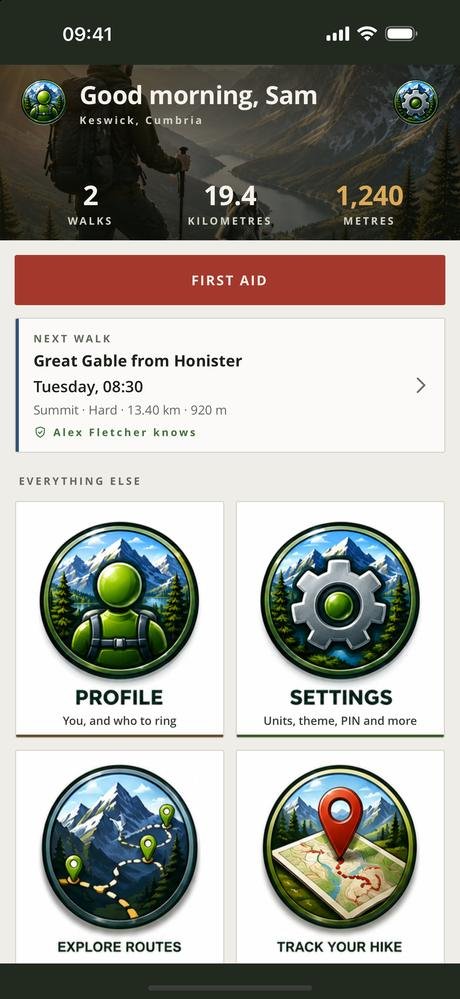
Five screens from version 1.1.0, three at a time — swipe, or use the arrows and dots. Tap a screenshot to see it full size. The apps are still being developed, so screens may look different in the version you download — these shots are not always updated the moment something changes.
Interested in an app like this, or in something else for iPhone, iPad or Android? Get in touch.